65 Keyboard Explained: A Complete Guide to Compact Mechanical Keyboards
As mechanical keyboards continue to grow in popularity among gamers, programmers, and everyday computer users, compact layouts have become a popular alternative to traditional full-size keyboards. Among them, the 65 keyboard has gained attention because it offers a practical balance between saving desk space and keeping important functions.
Unlike smaller layouts that remove more keys, a 65 keyboard keeps essential navigation keys while reducing unnecessary size. It is designed for users who want a cleaner workspace without giving up too much functionality.
In this guide, we will explain what a 65 keyboard is, its advantages and disadvantages, how it compares with other keyboard sizes, and how to choose the right model for your typing or gaming needs.
What Is a 65 Keyboard and How Does It Work?
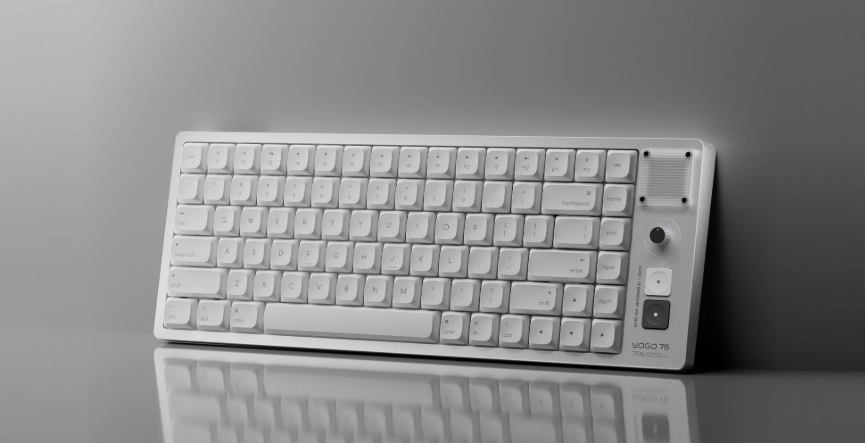
A 65 keyboard is a compact mechanical keyboard layout that usually includes around 65% of the keys found on a traditional full-size keyboard. It keeps the main typing area, arrow keys, and several navigation keys, while removing the number pad and function row.
Compared with a standard 104-key keyboard, a 65 keyboard typically has around 66–68 keys depending on the design. The layout allows users to access commonly used keys without requiring a large desk footprint.
Most 65 keyboards use mechanical switches, including linear, tactile, and clicky options. Many modern models also support hot-swappable switches, allowing users to replace switches without soldering. This makes customization easier for beginners and keyboard enthusiasts.
For users who work in small spaces, travel frequently, or prefer a minimal desk setup, a 65 keyboard can provide a comfortable typing experience while maintaining productivity.
Why Are 65 Keyboards Becoming More Popular Among Users?
The popularity of compact mechanical keyboards has increased as more people look for flexible setups for work, gaming, and creative tasks. A 65 keyboard fits well into this trend because it removes rarely used keys while keeping important controls.
For example, gamers often prefer a compact keyboard because the smaller width provides more mouse movement space. FPS players may benefit from having extra room for lower sensitivity mouse movements, while streamers and content creators appreciate a cleaner desktop setup.
Remote workers and programmers also find value in 65 keyboards. Many users spend long hours typing and prefer mechanical switches with a more satisfying feel compared with traditional membrane keyboards.
According to research from the keyboard enthusiast community, layouts between 60% and 75% have become increasingly common because users want portability without completely sacrificing functionality. The 65% layout is often considered a middle ground between minimalism and convenience.
What Are the Advantages and Disadvantages of a 65 Keyboard?
A 65 keyboard provides several benefits, but it may not be suitable for every user.
| Advantages | Disadvantages |
| Saves desk space compared with full-size keyboards | No dedicated number pad |
| Keeps arrow keys and important navigation keys | Function keys require shortcuts |
| Easy to customize with switches and keycaps | Smaller layout may require adjustment |
| Good balance for gaming and productivity | Some professional workflows may need extra keys |
Why Does a 65 Keyboard Offer a Better Balance Between Size and Functionality?
The biggest advantage of a 65 keyboard is its balance. A 60 keyboard is extremely compact but removes arrow keys, which can be inconvenient for editing documents, coding, or browsing spreadsheets.
A 65 keyboard keeps dedicated arrow keys, making everyday tasks easier. For example, writers can quickly move through documents, developers can navigate code more efficiently, and gamers can still access important controls without reaching for shortcuts.
What Features Might You Miss on a 65 Keyboard?
The main limitation is the missing number pad and function row. Users who frequently work with large amounts of numerical data, such as accountants or financial analysts, may prefer a full-size keyboard or separate numeric keypad.
Additionally, some shortcuts require using an Fn layer, which may take time for new users to learn.
See Also: Practical Ways to Make Class Presentations More Interactive
How Does a 65 Keyboard Compare With Other Keyboard Layouts?
Choosing the right keyboard size depends on your workflow, available desk space, and personal preferences.
| Layout | Size | Best For |
| 60 Keyboard | Very compact | Minimal setups and portability |
| 65 Keyboard | Compact with arrow keys | Gaming, office work, everyday use |
| 75 Keyboard | Compact with function row | Productivity and programming |
| TKL Keyboard | Larger compact layout | Users needing more traditional functions |
65 Keyboard vs 60 Keyboard: Which Compact Layout Should You Choose?
A 60 keyboard focuses on maximum portability. However, it removes dedicated arrow keys and navigation buttons. A 65 keyboard adds these missing functions while remaining compact.
For most general users, a 65 keyboard may feel more practical because arrow keys are frequently used for browsing, writing, and editing.
65 Keyboard vs 75 Keyboard: Which One Fits Your Typing Style?
A 75 keyboard includes a function row, making it closer to a traditional keyboard layout. Programmers and users who frequently use F1–F12 shortcuts may prefer this option.
A 65 keyboard is usually more compact and cleaner, making it attractive for gamers and users who want more mouse space.
65 Keyboard vs TKL Keyboard: Which Layout Is More Practical?
A TKL keyboard removes the number pad but keeps the function row and navigation cluster. It provides a familiar experience for users moving from a full-size keyboard.
However, a 65 keyboard takes up less space and offers a more minimalist design. The choice depends on whether you prioritize traditional functions or compactness.
How Do You Choose the Best 65 Keyboard for Your Needs?
When selecting a 65 keyboard, consider your typing habits, switch preferences, and connection requirements.
What Switch Type Should You Pick for a 65 Keyboard?
Mechanical switches generally fall into three categories:
Linear switches: Smooth keystrokes with no tactile bump, popular among gamers.
Tactile switches: Provide feedback during typing, suitable for many office users.
Clicky switches: Produce audible feedback for users who enjoy a traditional mechanical feel.
The best option depends on personal preference. Many enthusiasts test different switches before choosing their favorite.
Should You Buy a Wired or Wireless 65 Keyboard?
Wired keyboards usually provide consistent connection and are common among competitive gamers. Wireless 65 keyboards offer cleaner desk setups and greater flexibility for users who move between devices.
Modern wireless mechanical keyboards often include Bluetooth or 2.4GHz connections, making them suitable for everyday work and gaming.
Are Hot-Swappable 65 Keyboards Better for Beginners?
Hot-swappable keyboards are popular among beginners because they allow users to change switches easily. Instead of buying a completely new keyboard, users can experiment with different typing feels over time.
For users interested in customization, exploring a 65 keyboard collection can provide options with different layouts, switches, and designs.
Who Should Buy a 65 Keyboard?
A 65 keyboard is a strong choice for users who want a compact but practical keyboard. It works well for gamers, programmers, students, remote workers, and mechanical keyboard beginners.
If you value desk space, customization, and a balance between portability and functionality, this layout may fit your needs.
However, users who frequently use a number pad or many function keys should consider larger layouts.
Conclusion
The 65 keyboard has become popular because it offers a practical middle ground between compact design and everyday usability. It keeps important keys like arrows while reducing unnecessary space compared with traditional keyboards.
Whether you are building a gaming setup, improving your home office, or exploring mechanical keyboards for the first time, a 65 keyboard can provide a comfortable and customizable experience. Choosing the right switches, connectivity options, and features will help you find a keyboard that matches your workflow.
FAQs
What keys are missing on a 65 keyboard?
A 65 keyboard usually removes the number pad and function row found on larger keyboards. Some navigation keys may also be accessed through shortcuts.
Is a 65 keyboard good for gaming?
Yes, many gamers choose 65 keyboards because the smaller size creates more mouse space while keeping essential keys available for gameplay.
Can I customize a 65 keyboard with different switches and keycaps?
Yes. Many 65 keyboards support custom switches and keycaps, allowing users to personalize typing feel, sound, and appearance.